

Event Volunteer Management Software Buying Checklist
Use this event volunteer management software checklist to compare scheduling, reminders, accessibility, check-in, reporting, privacy, and implementation.
When an event depends on dozens or hundreds of volunteers, a missed reminder or unclear shift can create more work on the day that matters most. The right tool should make coordination easier without adding barriers for volunteers, staff, or community partners.
Event volunteer management software should help your team recruit, schedule, communicate with, check in, and report on volunteer activity while protecting personal information and supporting accessible participation. Compare tools against your actual event workflow, not a feature list alone.
Talk with Bike to the Beach about coordinating volunteers for a community event
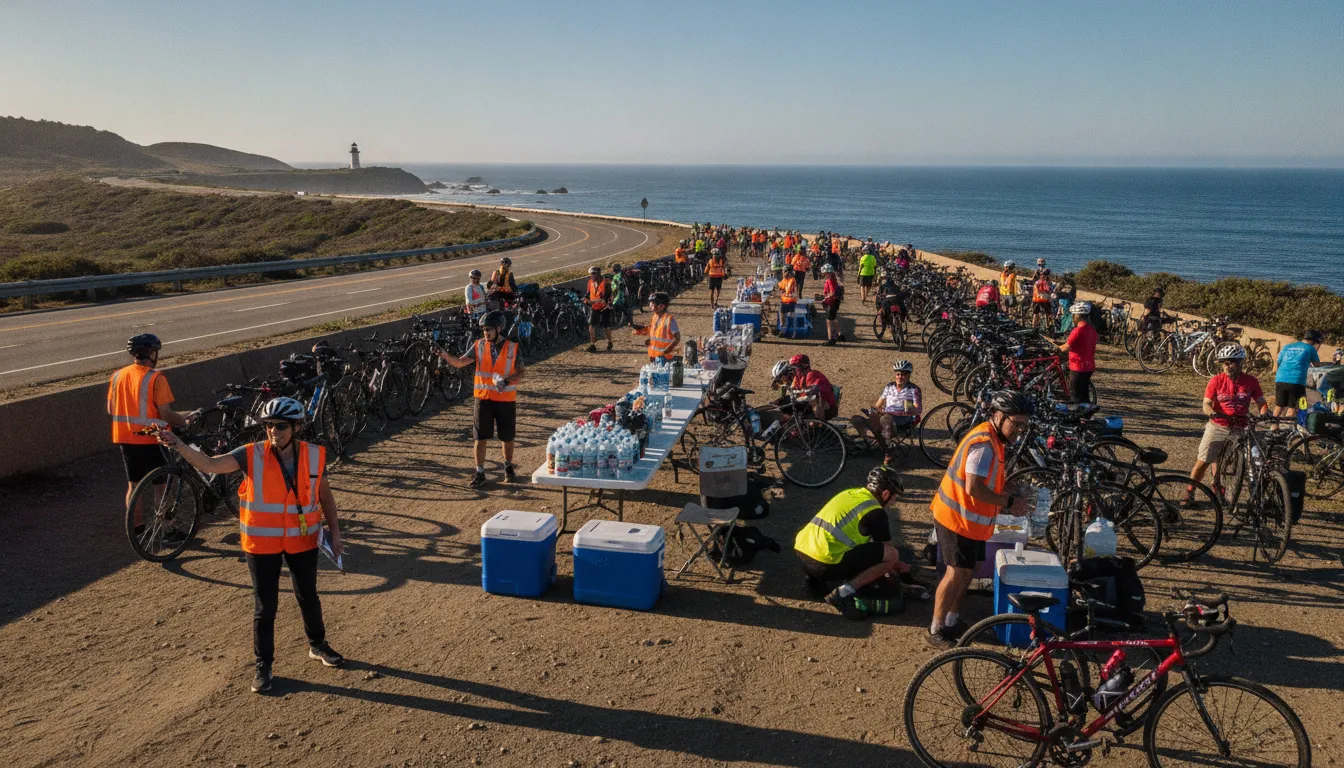
Start by mapping the roles your event needs, from check-in and rest-stop support to route and finish-line coverage. Bike to the Beach describes these as distinct event-day responsibilities, which is a useful reminder that software must fit real operations, not just maintain a roster (charity ride volunteer roles). From there, assess how each platform handles the core tasks your organizers and volunteers will use most.
What Should Event Volunteer Management Software Help You Do?
Event volunteer management software should help an organizing team move from an open volunteer need to a staffed, supported event without losing important details in spreadsheets, email threads, or separate sign-up tools. The right platform gives coordinators a clear way to recruit people, assign shifts, track participation, communicate updates, and review what happened afterward.
That does not mean every organization needs the most feature-rich system available. Start with the work your team actually needs to manage. A small community event may primarily need sign-ups, shift scheduling, reminders, and a reliable roster. A larger nonprofit event may also need check-in, hour tracking, volunteer profiles, document sharing, reporting, and analytics. These workflow categories are commonly used to describe volunteer management software, but each vendor may package or define them differently. Better Impact’s feature overview is one example of how a provider groups recruitment, scheduling, tracking, communication, and reporting capabilities.
Evaluate the workflow, not just the feature list
When comparing tools, ask whether the system makes the full volunteer journey easier for both coordinators and participants. Can someone find an appropriate role, receive the information they need, confirm a shift, and get a timely reminder? Can staff quickly see which positions remain open and contact the right people when plans change? A platform that checks many boxes but creates confusion on a phone or requires extensive manual follow-up may not be a good fit.
Use your real event structure as the test case. For example, Bike to the Beach describes event-day roles including check-in, rest stops, route support, and finish-line support. Reviewing those charity ride volunteer roles can help organizers translate their own responsibilities into staffing, communication, and reporting requirements. This article focuses on evaluating third-party software; Bike to the Beach is a nonprofit that runs community events, not a software provider.
Which Features Matter Most for Event-Day Coordination?
A useful platform should help your team move volunteers from sign-up to the right place at the right time, without making event-day communication harder. Start with the moments your coordinators manage manually, then check whether a tool supports those workflows clearly.
- Scheduling: Look for shift creation, role assignments, availability tracking, and a simple way to see open coverage. The schedule should distinguish locations and responsibilities, such as check-in, rest stops, route support, and finish-line support. These are common charity ride roles, and understanding the work behind them can help you evaluate software against real needs. Review the charity ride volunteer roles before building your feature checklist.
- Reminders and confirmations: Volunteers may need reminders about arrival times, parking, equipment, meeting points, or changes to their assignment. Some platforms may allow a shared sign-up link and automated reminders, while others may require more manual follow-up. Confirm what messages can be scheduled, who receives them, and how volunteers update their availability.
- Check-in and attendance: Ask whether coordinators can record arrivals, identify missing volunteers, and track hours without duplicating work in a spreadsheet. If the system offers mobile check-in, test it in the places where your event actually operates, including outdoor areas with inconsistent connectivity.
- Accessibility and flexibility: A scheduling interface should support the ways your volunteers participate. Check whether instructions, reminders, and forms can be written in plain language and whether coordinators can accommodate communication preferences, mobility needs, transportation constraints, or a change in assignment. Software cannot replace thoughtful planning, so use it alongside a broader guide to planning an accessible fundraiser.
- Communications and records: Useful capabilities may include volunteer profiles, document storage, communications, reporting, and analytics. Compare the specific workflow, permissions, and export options rather than assuming every vendor handles them the same way.
Finally, test the tool from both sides: a coordinator assigning a shift and a volunteer receiving, confirming, or changing it. The best fit is the one your team can use accurately under event-day pressure, not the one with the longest feature list.
How Should You Evaluate Reporting, Privacy, and Accessibility?
A platform can make scheduling easier, but the quality of its records and the experience it creates for volunteers matter just as much. Evaluate these areas together. A useful system should help your team understand what happened, protect the information it collects, and make participation clear for people with different needs.
Look beyond a dashboard
Ask vendors to show how reports are built from everyday actions. Can you see who was assigned, who checked in, which shifts were covered, and how many hours were recorded? Can authorized staff export the information in a practical format for grant reporting, partner updates, or internal planning? Better Impact, for example, lists hour tracking, check-in, reporting and analytics, document management, and volunteer profiles among its features. Those categories are useful prompts for evaluation, not proof that every platform handles them in the same way.
During a demo, request a report based on a realistic event rather than a polished sample. Test filters by date, role, location, and team. Clarify whether edits are logged, whether duplicate profiles can be identified, and whether a coordinator can correct an entry without losing the original context. Reporting should reduce manual reconciliation, not create another spreadsheet to maintain.
Ask specific privacy questions
Start by listing the information your event actually needs. Names, contact details, emergency information, availability, and attendance records may all require different handling. Ask where data is stored, who can access each field, how permissions are assigned, and how access is removed when a coordinator or volunteer leaves. Also ask about retention and deletion controls, backups, exports, and the process for responding to an account or data issue.
Do not accept a general statement that a product is secure as the entire review. Request the vendor’s current privacy documentation and contract terms, then have the person responsible for your organization’s data practices review them. Limit administrator access, use strong account protections, and avoid collecting sensitive details simply because a field is available.
Test accessibility in the real workflow
Accessibility should cover registration, confirmation messages, shift changes, check-in, and communication after the event. Ask whether the interface works with keyboard navigation and common assistive technologies, whether form labels and error messages are clear, and whether text, controls, and instructions remain understandable on a phone. Test the volunteer-facing experience yourself instead of relying only on a vendor’s checklist or certification claim.
Use the same practical lens when planning the event itself. Our guide to planning an accessible fundraiser can help your team consider inclusive logistics alongside the software review.
How Do You Compare Platforms Without Overbuying?
The right event volunteer management software is the one that fits your event, team, and volunteers, not necessarily the platform with the longest feature list. Start by mapping the work your team actually needs to coordinate. For a charity ride, that may include check-in, rest stops, route support, and finish-line support. You can review examples of charity ride volunteer roles before comparing tools.
Then evaluate each option against the same questions. Can volunteers sign up for the roles and shifts they understand? Can coordinators see coverage gaps quickly? Will reminders and check-in reduce event-day follow-up, or create another system to maintain? Ask for a live demonstration using a realistic event scenario rather than accepting a generic product tour.
| Decision area | What to compare | Question to ask |
|---|---|---|
| Event fit | Roles, shifts, locations, and last-minute changes | Can it reflect our actual event-day workflow? |
| Volunteer experience | Sign-up clarity, reminders, mobile access, and accessibility | Can people complete the process without extra help? |
| Coordinator workflow | Scheduling, check-in, communications, and coverage visibility | What work becomes simpler, and what work remains manual? |
| Reporting and privacy | Hours, attendance, exports, permissions, and data handling | Can we access the reports we need while limiting unnecessary data? |
| Total effort | Setup, training, integrations, support, and transparent costs | What will this require before, during, and after the event? |
A simple scoring sheet can expose tradeoffs without pretending there is one universally best choice. Include input from a coordinator, a volunteer, and anyone responsible for privacy or reporting. If a platform solves a minor inconvenience but adds substantial training or administration, it may be overbuying rather than an upgrade.
What Is the Best Way to Test a Volunteer Platform?
- Define one real event workflow. Map the roles, handoffs, and information your team must manage, rather than testing a generic feature list. For a supported ride, that might include check-in, rest-stop coverage, route support, and finish-line support. Use the existing charity ride volunteer roles as a practical example of the operational detail to capture.
- Run a focused demo. Ask each vendor to demonstrate the same tasks with your terminology and staffing model. Watch how an organizer creates a role, assigns a volunteer, communicates a change, and checks the resulting information. Note which steps feel clear and which require workarounds.
- Pilot with a small team. Test the platform with people who represent the event, including volunteer leads and nonprofit or community partners involved in logistics. Use a limited set of roles or one planning cycle. Their feedback can reveal barriers that a central administrator may miss.
- Measure the rollout readiness. Record what happened during the pilot: unanswered questions, duplicate work, missed handoffs, accessibility concerns, and time spent learning the system. Also confirm who owns volunteer communication, schedule changes, and day-of support. The goal is a dependable process, not simply a completed setup.
- Prepare a fallback before launch. Keep an accessible copy of essential assignments and contact information, and decide how the team will communicate if the platform is unavailable. Volunteer teams and nonprofit partners may need a clear offline process for rest stops or other event operations. A fallback should support continuity without creating unnecessary duplicate data entry.
Questions to Ask Before Choosing a Tool
Use these questions in a vendor demo or internal review:
- Can the system handle one-day events, multiple sites, varied roles, and last-minute substitutions?
- Can volunteers register and select shifts without unnecessary steps?
- How are reminders sent, scheduled, approved, and updated when plans change?
- What is the fastest check-in workflow, and what is the offline or backup option?
- How does the platform support keyboard access, assistive technology, readable content, language needs, and non-smartphone alternatives?
- Which reports are included, and can we filter and export attendance, hours, open roles, and communication history?
- What personal information is collected, who can access it, how long is it retained, and how can it be deleted or exported?
- What training and support are included before and during the event?
- Which integrations are essential for our existing registration, email, calendar, or donor workflows?
- What setup, migration, administration, renewal, and cancellation work should we budget for?
A focused event volunteer management software evaluation should leave your team with a documented decision, not just a persuasive demo. Keep the scorecard, note unresolved risks, and revisit the decision after the first event so the next season benefits from what your volunteers and coordinators actually experienced.
Talk with Bike to the Beach about coordinating volunteers for a community event
Frequently Asked Questions
What is the best software for volunteer management?
The best option is the one that fits your event structure, volunteer experience, accessibility needs, privacy expectations, reporting requirements, and team capacity. Compare the same workflow across vendors instead of choosing from feature counts alone.
What is the best software for volunteer rostering?
Look for clear role and shift assignment, capacity limits, waitlists, reminders, substitutions, and views that help coordinators see open positions quickly. Test the roster with realistic cancellations and last-minute changes.
What is the best event management software for nonprofits?
For a nonprofit, the right tool should support the event without creating unnecessary administrative or financial burden. Evaluate setup effort, accessibility, reporting, privacy, support, integrations, and total cost against the specific event workflow.
What is the best free app for tracking volunteer hours?
A free app may be useful when your needs are limited, but confirm how it handles corrections, exports, permissions, privacy, and support. A simple tool that produces dependable records can be more useful than a free system that requires extensive manual cleanup.
Plan a More Connected Community Event
Contact Bike to the Beach to explore community event participation and partnership opportunities. The organization brings riders, volunteers, nonprofit partners, and supporters together through purpose-driven charity bike rides, with a focus on local autism and disability communities.